
Introduction
No Privacy Compromises. Just Smart Automation.
Most commercial financial dashboards (for example Mint or Personal Capital) rely on an account‑aggregation provider such as Plaid or Yodlee, which means granting a third‑party service read access to your balances and transaction history across linked accounts. Furthermore, they usually charge a monthly fee or force distracting ads into your feed…not what I want when I’m trying to make important financial decisions.
So I built my own automated investment tracker. Cost? $0/month. Privacy? 100% intact.
Here’s how I did it, and how you can too.
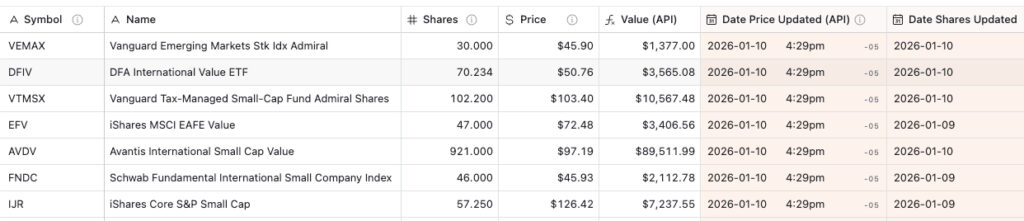
Screenshot of an Airtable holdings table with hypothetical data showing automated portfolio tracking.
The Problem with Existing Solutions
Most portfolio tracking tools require you to:
- Connect your brokerage accounts via Plaid/Yodlee (major privacy concern – giving third parties read access to all your accounts)
- Pay monthly subscriptions ($10-50/month) or tolerate distracting advertisements
- Accept their limitations (can’t customize data structure or reports)
- Trust third parties with your complete financial picture
As someone managing a diversified portfolio across multiple asset classes (US stocks, international stocks, small-cap value, REITs, bonds), I needed something more flexible and private.
The Solution: A Custom Automated System
My system updates up to 25 ETF/mutual fund holdings automatically every trading day, 15 minutes after market close (you could track more holdings, or get more frequent price updates, but it would require upgrading to a paid plan). The only manual inputs I need are:
- Initial setup: Add ticker symbols and asset class categorization
- Occasional updates: When my share quantities change (buys/sells/dividends)
Everything else—prices, portfolio values, asset allocation, performance tracking—updates automatically. And my brokerage credentials stay exactly where they belong: with me.

Wise use of technology keeps your financial data private
The Tools: A Perfect Combination
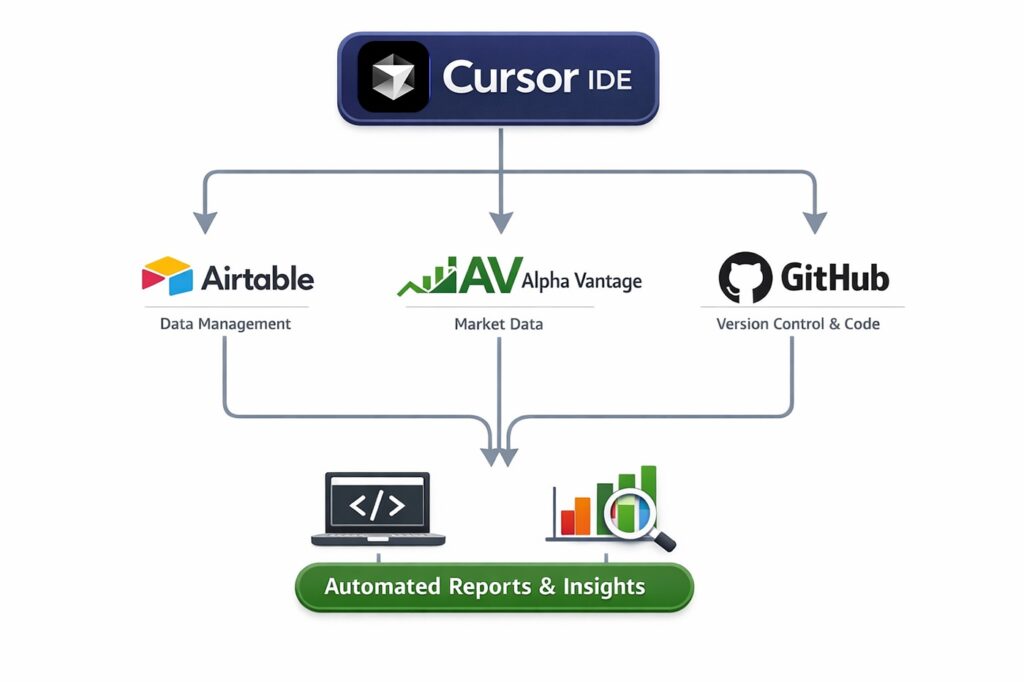
Workflow diagram showing Cursor + Airtable + Alpha Vantage + GitHub connected
1. Cursor – Your AI-Powered Development Partner
Cursor is an AI-first code editor that writes production-ready code based on natural language instructions. Think of it as having an expert developer on call 24/7.
What it does: I described what I wanted (“automate daily price updates for 20 holdings using Alpha Vantage’s free API”), and Cursor generated the entire system – Python scripts, error handling, rate limiting, smart rotation logic, and GitHub Actions workflows.
Why it matters: You don’t need to be a programmer. Cursor handles the technical complexity while you focus on the business logic.
My results: Just a few hours from concept to production, including:
- Automated daily updates
- Smart weekend detection (only runs if needed)
- Rate limit management
- Error recovery
- Version control
- Complete documentation
2. Airtable – Your Visual Database
Airtable is a no-code database platform that looks like a spreadsheet but works like a powerful relational database.
What it does: Stores all my investment data in a beautiful, flexible interface. I have two main tables:
- Holdings Table: Tracks each position (symbol, shares, price, value, last update)
- Diversification Table: Calculates asset allocation across 10+ asset classes
Why it matters:
- Visual: See your entire portfolio at a glance
- Flexible: Custom views (holdings over a certain amount, by asset class, by performance, purchased over 365 days ago, etc…)
- Relational: Link tables to calculate complex metrics
- Automation-ready: Native automation tool is easy to use for non-coders; API access allows more complex automations for the tech-savvy
My setup:
- Filtered view shows only holdings $1+ (saves API calls)
- Rollup fields calculate total portfolio value
- Formula fields compute asset allocation percentages
- Links to Diversification table for Paul Merriman-style asset class analysis
For even more privacy and control: Those seeking maximum data sovereignty could use Baserow, an open-source alternative to Airtable that can be self-hosted on a private server. Very tech-savvy users might even opt for PostgreSQL and build a custom interface, though this requires significantly more development expertise.
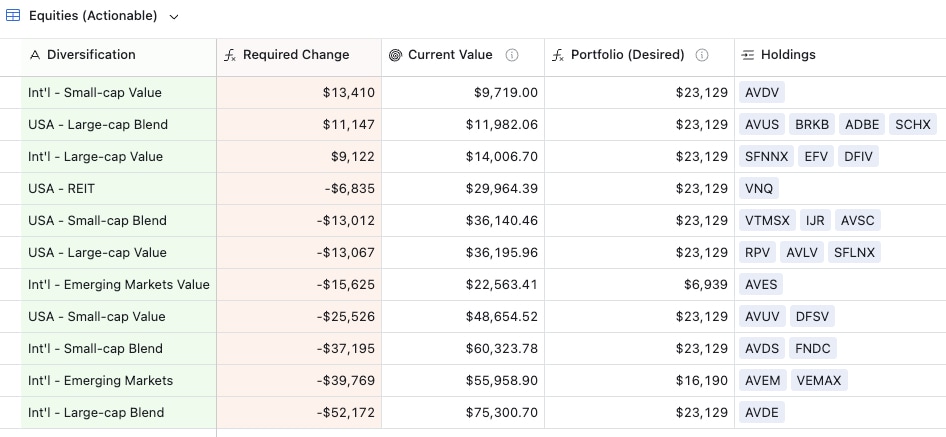
An Airtable view displaying hypothetical sample data to illustrate asset-class diversification and calculated rebalancing amounts.
3. Alpha Vantage – Free Market Data API
Alpha Vantage provides real-time and historical stock market data via a free API (25 calls/day, perfect for up to 25 holdings).
What it does: Fetches latest closing prices for all my ETFs and mutual funds 15 minutes after market close (4:15 PM EST).
Why it matters:
- Free tier: 25 API calls/day (enough for most investors)
- Reliable: Professional-grade data used by institutions
- Comprehensive: Stocks, ETFs, mutual funds, forex, crypto
Smart features I built in:
- 3-second delays between calls (respect rate limits)
- Automatic exclusion of money market funds (always $1)
- Priority updates for least-recently-updated holdings
- Graceful handling of API limits (continues next day)
Pro Tip:
Alpha Vantage’s free tier offers 25 API calls per day, but you can double this limit by creating a second free account and configuring separate API keys – one for local development testing (AV_API_KEY_DEV) and another for production automated runs via GitHub Actions (AV_API_KEY_PROD). This gives you 50 total calls per day with complete isolation between environments, ensuring your local testing never consumes your production quota.
4. GitHub – Free Hosting, Backups, and Automation
GitHub is where developers store code, but it’s also a powerful automation platform – and it’s free.
What it does for me:
- Version control: Every change tracked, can roll back anytime
- Backups: Complete project history stored in the cloud
- GitHub Actions: FREE automated workflows (2,000 minutes/month free tier)
- Open-source ready: Will allow me to provide all this as an open-source project, easily accessed by other developers, should I choose to do so
My automation:
- Runs daily at 4:15 PM EST (Monday-Friday)
- Smart weekend logic: Only runs Saturday/Sunday if needed
- Updates all holdings in ~90 seconds
- Logs everything for troubleshooting
- Zero server costs
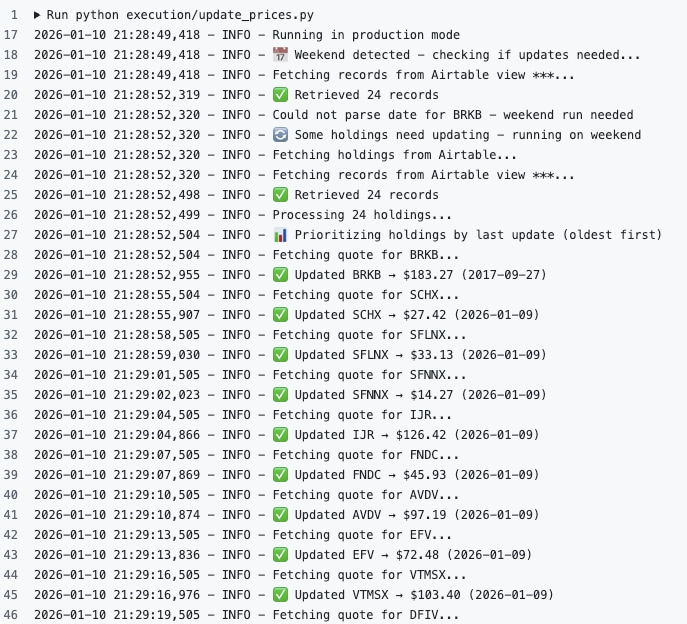
GitHub Actions workflow showing successful daily automation run
How It Works: The Daily Flow
Weekday (4:15 PM EST)
- GitHub Action triggers automatically
- Script checks: Should we run today? (weekday = yes)
- Fetches holdings from Airtable (filtered view: $1+ only)
- Excludes money markets (VMFXX, SWVXX—always $1, waste of API)
- Smart rotation: Prioritizes least-recently-updated holdings
- For each ticker:
- Waits 3 seconds (rate limit compliance)
- Calls Alpha Vantage API
- Gets latest price
- Updates Airtable with price + precise timestamp
- Logs results: “Updated 22 records: VTI → $250.45, VXUS → $65.23…”
Weekend (Smart Logic)
- Saturday 4:15 PM: Checks if all holdings updated Friday
- All current? → Skips (saves GitHub Actions minutes)
- Some missing? → Runs to catch up (handles Friday API limit overflow)
- Sunday: Same check
Result
Every trading day, my portfolio is automatically updated with zero manual effort. I just open Airtable to see:
- Current prices (updated 15 min after market close)
- Total portfolio value
- Asset allocation breakdown
- Performance tracking (coming soon)
The Privacy Advantage
What I’m NOT giving up:
- ❌ Brokerage login credentials
- ❌ Complete financial picture
- ❌ Transaction history
- ❌ Account numbers
- ❌ Personal identifying information
What I control:
- ✅ Which data to track (only holdings I choose)
- ✅ Where it’s stored (my Airtable base)
- ✅ Who has access (just me)
- ✅ Custom analysis (my rules, my calculations)
This is especially important for investors following strategies like Paul Merriman’s Ultimate Buy & Hold approach, where you’re likely managing 10 or more different asset classes.
Real-World Example: Paul Merriman’s Strategy
I built this system to track my implementation of Paul Merriman’s Ultimate Buy & Hold Strategy – a diversified approach spanning:
- US Large Cap Value & Growth
- US Small Cap Value & Growth
- International Large Cap Value & Growth
- International Small Cap Value
- Emerging Markets
- US REITs
The challenge: Tracking 10+ asset classes across multiple accounts (e.g. 401k, IRA, taxable) manually was time-consuming. Every month or so when it came time to rebalance or contribute to a retirement fund, I would need to manually update the value of each of my holdings in order to determine the proper diversification to pursue. Sometimes I would delay contributions because my data was not up to date.
The solution: My automated system tracks every position, calculates precise asset allocation, and will soon alert me to rebalancing opportunities—all without exposing my accounts to third parties.
Fun fact: I also built the donation platform for the Merriman Financial Education Foundation, which provides free investment education to millions of DIY investors.
Future Enhancements: Making It Even Smarter
This is just the beginning. Here are some possible improvements I will add on:
Phase 2: Backtesting (Q1 2026)
- Historical price data analysis
- Performance tracking over time
- Benchmark comparisons (S&P 500, total market, etc.)
- Visualize how my actual returns compare to Paul Merriman’s model portfolios
Phase 3: Reporting (Q2 2026)
- Automated weekly/monthly performance reports
- Email summaries with insights
- Best/worst performers identification
- Asset allocation drift alerts
- Rebalancing recommendations
Phase 4: Tax-Loss Harvesting Alerts (Q3 2026)
- Track cost basis by lot
- Calculate unrealized gains/losses
- Alert when positions hit tax-loss harvesting thresholds
- Suggest specific lots to sell for tax optimization
- Identify replacement securities (avoid wash sale rules)
Phase 5: Multi-Account Aggregation (Q4 2026)
- Track positions across multiple brokerages
- Calculate overall asset allocation
- Optimize tax location (which assets in which account types)
- Whole-portfolio rebalancing strategies
The Cost Breakdown
Free Tier (Perfect for Most Investors):
- Cursor: Free for personal use
- Alpha Vantage: Free (25 calls/day = enough for most investors)
- GitHub: Free (2,000 Actions minutes/month = plenty)
- Airtable: Free (1,000 records on free plan = unlikely you will need to upgrade)
- Total: $0/month
If You Outgrow Free Tiers:
- Alpha Vantage Premium: $50/month (unlimited calls, historical data)
- Airtable Plus: $20/user/month (50,000 records, advanced features) …or switch to Baserow, an open-source alternative
- GitHub Pro: $4/month (3,000 Actions minutes)
The Technical Architecture (For the Curious)
This system follows the 3-layer architecture framework:
Layer 1: Directives (What to do)
Markdown documents describing the workflow, edge cases, and business logic. Think of these as SOPs for the AI.
Layer 2: Orchestration (Decision making)
Cursor AI reads directives and makes intelligent decisions—which script to call, how to handle errors, when to update documentation.
Layer 3: Execution (Doing the work)
Python scripts that do the actual work—API calls, data processing, Airtable updates. These are deterministic and testable.
Why this matters: Separating concerns makes the system maintainable. I can modify business logic (Layer 1) without touching code, and Cursor handles the implementation details.
Files created:
update_prices.py– Main orchestrator (325 lines)airtable_client.py– API wrapper with retry logicrate_limiter.py– Prevents API throttlingupdate_daily_prices.md– Complete workflow documentation.github/workflows/daily-update.yml– Automation schedule
Total codebase: ~800 lines of production-ready Python, all generated by Cursor in a few hours.
Key Technical Features
Smart Rotation
If you have >25 holdings and hit the 25 calls/day limit:
- Day 1: Updates 25 oldest holdings, hits limit
- Day 2: Updates remaining holdings + rotates back
- Result: All holdings stay current over 2-day cycle
Weekend Intelligence
The system doesn’t blindly skip weekends—it checks if you need catch-up:
- All updated Friday? → Skips weekend (saves Actions minutes)
- API limit hit Friday? → Runs Saturday to finish
- Still not done Saturday? → Runs Sunday
Precise Tracking
Every update includes:
- Exact price (e.g., $250.45)
- Precise timestamp (ISO 8601: 2026-01-09T16:15:00.000Z)
- Days since last update
- Update success/failure status
Error Resilience
- 3x retry with exponential backoff (Airtable API)
- Graceful rate limit handling (Alpha Vantage)
- Continues on partial failures (won’t stop on 1 bad ticker)
- Detailed logging for troubleshooting
Who This Is For
Perfect for:
- Privacy-conscious investors
- DIY investors (Bogleheads, Paul Merriman followers)
- Portfolio managers tracking 10+ positions
- Anyone wanting custom portfolio analytics
- Investors across multiple accounts/brokerages
- Tech-savvy investors who want control
Not ideal for:
- Day traders (free tier only updates daily)
- Active traders needing real-time data
- People wanting zero setup (this requires 2-3 hours initial config)
- Those uncomfortable with APIs, and unwilling to learn Cursor or a similar AI-powered integrated development environment (IDE)
Getting Started: Three Options
Option 1: DIY (Free)
Follow my complete setup guide on GitHub (coming soon: public release with templates).
- Time investment: 2-3 hours initial setup
- Technical skill: Basic comfort with tools
- Cost: $0/month
Option 2: Semi-Guided (Affordable)
I can provide:
- Pre-configured Airtable templates
- Cursor project files ready to customize
- Step-by-step video walkthrough
- Email support for troubleshooting
Time investment: 1 hour
Technical skill: Minimal
Cost: One-time setup fee
Option 3: Done-For-You (Turnkey)
I’ll build your custom automated portfolio tracker:
- Tailored to your strategy (Paul Merriman, Bogleheads, etc.)
- Custom asset class structure
- Advanced features (tax-loss harvesting, rebalancing alerts)
- Ongoing support
Time investment: Just a consultation call
Technical skill: None required
Cost: Custom quote based on complexity
Let’s Build Your System
I’m Dr. Kerry Kriger, founder of Zero2Webmaster, and I help non-coders leverage automation to save time and increase efficiency.
What I can help with:
- 📊 Airtable data management – Database design and automation
- 🤖 Cursor projects – AI-powered software development
- 🌐 Website development – WordPress, the world’s most powerful and flexible web design software (bonus…it’s open-source!)
- 🔧 Custom technology solutions – Whatever your workflow needs
Book a free 30-minute consultation: zero2webmaster.com/booking

When I’m not building websites, databases or automations, I like to hike in the mountains. The extinct volcano Rucu Pichincha in the background, above Quito, Ecuador.
The Bottom Line
I built an automated investment tracking system that:
✅ Costs $0/month
✅ Updates daily automatically
✅ Requires zero privacy compromises
✅ Handles 25+ holdings effortlessly
✅ Scales to advanced features (backtesting, tax optimization)
✅ Gives me complete control over my data
The old way:
- Connect brokerage → Lose privacy
- Pay $10-50/month → Ongoing cost
- Accept limitations → Frustration
The new way:
- Build once → Own forever
- Automate everything → Save time
- Customize freely → Perfect fit
If you’re a technologically minded investor who values privacy, control, and customization—this approach changes everything.
Resources
- Paul Merriman’s Ultimate Buy & Hold Strategy: paulmerriman.com
- Support Financial Education: Merriman Foundation Donation Platform (built by me!)
- Learn Cursor: zero2webmaster.com/cursor
- Learn Airtable: zero2webmaster.com/airtable
- Book Consultation: zero2webmaster.com/booking
Ready to take control of your investment tracking? Let’s build something amazing together.
— Dr. Kerry Kriger
Zero2Webmaster Founder & President
P.S. This system is just the beginning. Once you have automated data collection, the possibilities are endless – custom reports, advanced analytics, tax optimization, even algorithmic rebalancing. The infrastructure is there; now we just keep building on it.
“Congratulations on publishing that comprehensive article your privacy-first, automated investment tracker! It’s incredibly well-written and thorough – covers everything from the privacy concerns with traditional tools, to the technical architecture, to the future phases. The dual API key tip fits perfectly in there. This is going to be super valuable for anyone looking to build their own private investment tracker!” – C.S., California