
Daily Work Summary
I’m a builder. On any given day I might push a dozen commits across five different projects — adding a plugin feature here, fixing a bug there, refactoring an API integration somewhere else. By 9pm I genuinely can’t remember everything I did. Sound familiar?
That frustration is what led me to build Daily Work Summary — a free tool that automatically emails you a clean digest of every commit you made across all your GitHub repositories, every single day.
What It Does
Daily Work Summary is a GitHub Actions workflow that runs on a schedule (you choose the time and timezone). At the end of your workday it:
- Scans every GitHub repository you own for commits made in the past 24 hours
- Groups them neatly by account and repo
- Optionally generates AI-powered plain-English summaries of what changed (your choice of OpenRouter, OpenAI, Anthropic, or Google Gemini)
- Emails you the full digest in a clean, readable format
- Saves a Markdown archive of every summary directly in the repository
No server to maintain. No subscription. It runs entirely inside GitHub’s free infrastructure.
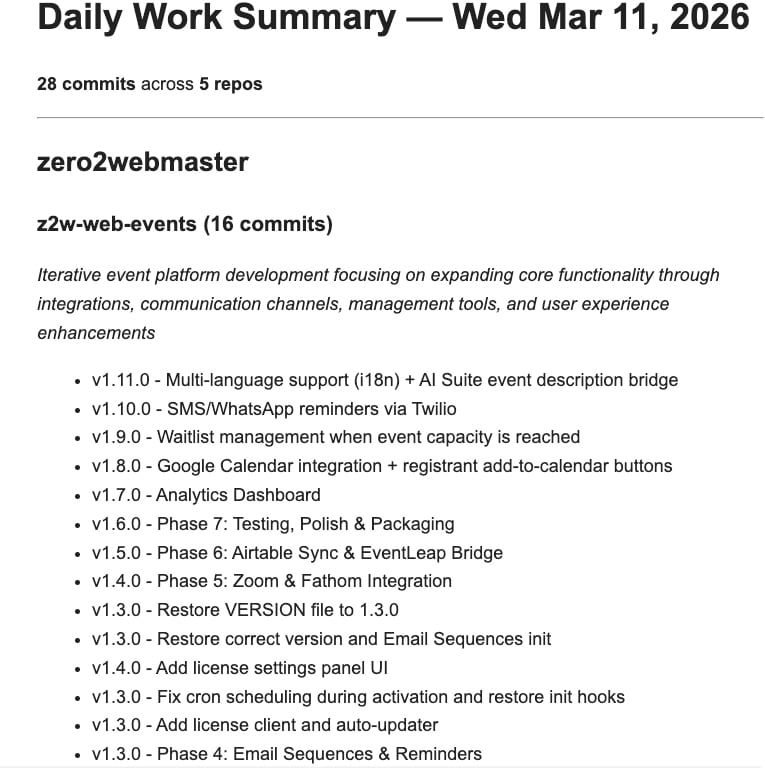
Your daily digest lands in your inbox automatically — no setup beyond a one-time fork and adding your Github secrets.
Who Would Want This?
Honestly, almost any developer — but especially if you recognize yourself in any of these:
- You do so much in a day you can’t remember it all. That feeling of “wait, what did I actually accomplish today?” goes away when a summary lands in your inbox every evening.
- You want positive reinforcement. Seeing your work listed out — even the small fixes — is genuinely motivating. You did do things today.
- You need to know where to pick up tomorrow. Your last commit messages are right there. No digging through terminal history or trying to remember what branch you were on.
- You report to someone. Clients, managers, anyone collecting timesheets or progress updates — you can forward this email as-is or copy the highlights. It takes five seconds instead of twenty minutes.
- You manage multiple repos or accounts. Instead of checking each repo individually, everything is consolidated in one place.

Some days are a blur of commits — this tool makes sure you remember every one.
What I Built It With
The project is built primarily with:
- Python — the core summary generation script
- PyGithub — to authenticate and pull commit data from the GitHub API
- GitHub Actions — as the free, serverless scheduler and runner
- Gmail SMTP — for email delivery (via App Passwords, so no OAuth headaches)
- OpenRouter / OpenAI / Anthropic / Gemini — optional AI summarization, pick whichever API you already have
Total build time was a few hours. AI token costs during development came to about five dollars. Ongoing cost to run it: $0 (the GitHub Actions free tier comfortably covers it).
It’s Completely Free
The repository is public and free to use:
Fork it, configure four secrets, and you’re done.
How to Get Started (Even If You’ve Never Used GitHub)
GitHub is the world’s most popular platform for storing and sharing code. It’s specifically designed for software projects — it tracks every change, keeps a full history, and makes it easy to copy someone else’s project and customize it for yourself. That process of copying a project is called forking.
How to get Daily Work Summary running for your own GitHub account:
- Create a free GitHub account at github.com if you don’t have one
- Visit the repository: github.com/zero2webmaster/daily-work-summary
- Click “Fork” (top-right corner) — this copies the project into your own GitHub account
- Add your secrets — in your forked repo, go to Settings → Secrets and Variables → Actions, and add:
PAT_GITHUB— a GitHub Personal Access Token withrepoandread:userpermissionsEMAIL_USERNAME— your Gmail addressEMAIL_PASSWORD— a Gmail App Password
- Set your timezone — go to Settings → Variables and add
EMAIL_TIMEZONEwith your IANA timezone (e.g.,America/New_York,America/Los_Angeles,Europe/London) - Adjust the send time — edit
.github/workflows/daily-summary.ymland change the cron schedule. The default is 10pm Eastern / 3am UTC.
The full setup guide is in the repository README with every step documented.

Maybe you already get too much email…no problem: you can configure Daily Work Summary to deliver to your Slack or Airtable account.
Part of a Bigger Philosophy
Daily Work Summary is a standalone tool, but it reflects the same philosophy behind everything I build at Zero2Webmaster: own your stack, eliminate unnecessary subscriptions, and use AI to do more with less. That same thinking drives the Z2W Complete Suite — a collection of WordPress plugins including the Z2W AI Suite, Admin Suite, Creative Suite, Seller Suite, Science Suite, and more — all designed to help website owners replace SaaS dependency with tools they actually control.
A Personal Note
I’ve been building websites since 2008 and began developing software in December 2025. Over the past few months I’ve created dozens of private GitHub repositories — internal tools, client projects, automation scripts, WordPress plugins. None of them were public.
This is my first ever public repository.
I built it because I wanted it for myself, and then thought: why not share it? If it saves even a handful of developers the ten minutes of end-of-day mental reconstruction, it’s worth it.
Fork it. Customize it. If you improve it, I’d genuinely love to see your pull requests.
Dr. Kerry Kriger
Zero2Webmaster Founder