Real benchmark data from identical WordPress installs — and what it means for your hosting costs, security, and sanity.
You probably didn’t install 21 plugins on purpose.
It happened gradually. You needed a login redirect, so you installed a plugin. Then a duplicate post button. Then something to clean up the database. Then something to hide admin notices. Then something to check broken links. Before you knew it, your WordPress dashboard looked like a software graveyard — 21 separate plugins, 21 separate authors, 21 separate opinions about how WordPress should work.
That’s plugin sprawl. And it’s costing you more than you think. At Zero2Webmaster, we built Z2W Admin Suite to solve exactly this problem — consolidating 21 of the most common WordPress plugins into a single, modular toolkit. This article shows you the benchmark data, the real-world cost breakdown, and why the architectural difference between one plugin and twenty-one matters more than most site owners realize.
What 21 Plugins Actually Do to Your Server
In February 2026, we ran a controlled benchmark test: two identical WordPress installs on the same server, same PHP version, same MySQL instance.
Site A ran the 21 individual plugins that Z2W Admin Suite was built to replace, plus Query Monitor for measurement and WooCommerce (because several of those 21 plugins require WooCommerce, and because most business websites run it anyway).
Site B ran Z2W Admin Suite alone, plus the same Query Monitor and WooCommerce installs for a fair comparison. We measured everything with Query Monitor.
The results were not subtle!
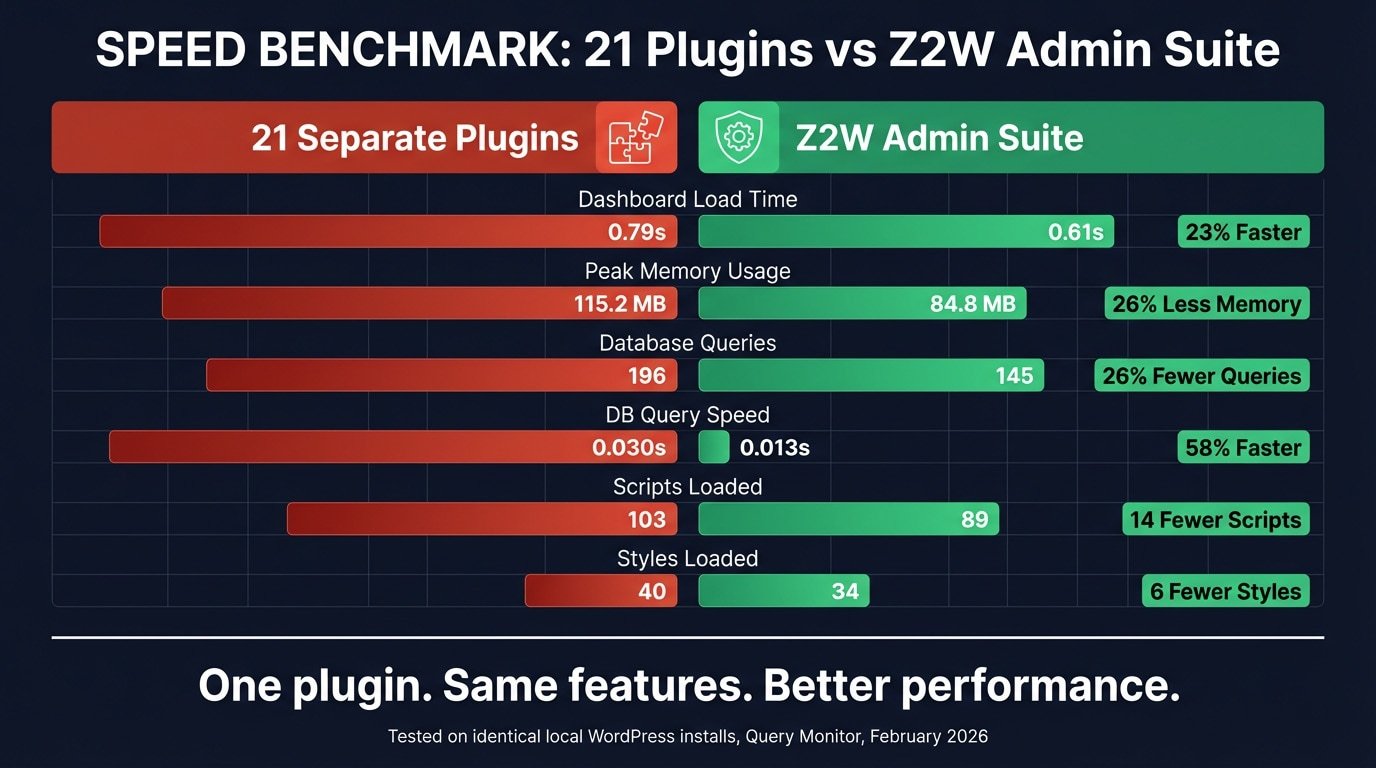
Test Results For Admin Dashboard Page:
Test Results For Plugins Page:
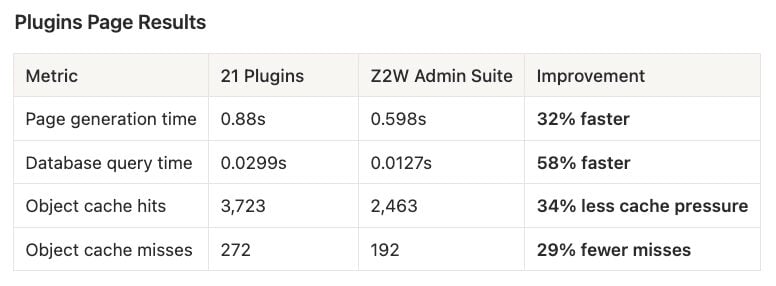
Every single metric improved. Not some. All of them.
What These Numbers Actually Mean for Your Site
Raw benchmark numbers are easy to shrug off. Let’s make them concrete.
Memory Usage on Shared Hosting
The 21-plugin configuration consumed 115.2 MB of RAM to load a single admin dashboard page. Z2W Admin Suite delivered the same functionality — all 29 modules active — at 84.8 MB. That’s 30 MB of headroom returned to your server. On shared hosting plans where PHP memory limits are set to 128 MB or 256 MB by providers, that difference can mean the gap between a dashboard that loads and a white screen of death. When you’re already close to your memory ceiling and a heavy operation kicks off — a large import, a page builder block render, a bulk media action — every megabyte matters.
Database Queries and Hosting Costs
The 21-plugin setup fired 196 database queries to load the admin dashboard. Z2W fired 145 — 51 fewer round trips to your database on every single admin page load. This happens because every plugin you install registers its own database lookups, filter hooks, and option checks. They don’t share. Z2W Admin Suite uses a unified settings architecture — all active modules draw from a shared configuration rather than each making independent calls. For sites on hosting plans that bill by resource consumption — or for agencies managing 10, 20, or 50 client sites — 51 fewer queries per page load per site compounds quickly into real infrastructure savings.
Page Generation Time, Compounded Over a Year
A 23% improvement on the dashboard and a 32% improvement on the plugins page sounds like a quality-of-life win. It is — but the compound effect is worth calculating. A site administrator loading admin side pages on their site 100 times per week across 50 working weeks is making 5,000 admin page loads per year. The 21-plugin setup generates each dashboard page in 0.79 seconds; Z2W generates it in 0.61 seconds — a savings of 0.18 seconds per load. Across 5,000 loads, that’s 15 minutes of pure waiting eliminated from your year. That number grows proportionally for agencies with multiple admin users across multiple client sites. It’s not just faster in the moment — it’s a measurable reduction in wasted time at scale.
Your Frontend Visitors Pay the Price Too
Most of Z2W Admin Suite’s 29 modules operate exclusively in the admin — they never load a single line of CSS or JavaScript on your public pages. The few modules that do touch the frontend (YouTube Enhancer, External Links, PDF Embed) only enqueue assets on pages where the feature is actually used. By contrast, many standalone plugins register their scripts and styles globally — loading on every page regardless of whether they’re needed. The result: Z2W’s frontend footprint is minimal by design, while 21 separate plugins each make their own decisions about what to load and where. Your visitors feel the difference on every page.
Imagery on this page was created for less than 20 cents using the Z2W AI Suite plugin, which delivers over 110 AI-powered tools engineered to make your website development more efficient and productive than ever before.
The Costs That Don’t Show Up in Query Monitor
Performance overhead is only one dimension of what 21 plugins cost you. The others are harder to measure but no less real.
Update Fatigue
Twenty-one plugins mean twenty-one update cycles. Every week, you’re reviewing changelogs, checking compatibility notes, wondering whether the new version of Plugin #14 will break something Plugin #7 depends on. Updates that sound minor — “fixed a CSS conflict” — can have downstream consequences you won’t catch until a client calls to report something broken. Managing this across one site is tedious. Managing it across a portfolio of sites is a part-time job, literally.
Conflict Risk Compounds With Every Plugin You Add
Every plugin hooks into WordPress events at its own priority, in its own order, with its own assumptions about what other plugins are or aren’t running. The more plugins you stack, the more potential interaction points you create. This is not theoretical — WordPress conflicts are among the most common reasons sites break after updates, and diagnosing them typically means deactivating plugins one by one until the culprit surfaces. With 21 potential culprits, that process can take hours.
Fragmented Support Is a Hidden Time Tax
When something goes wrong in a consolidated toolkit, you have one place to look and one author to contact. When something goes wrong across 21 plugins, the first challenge is even diagnosing which plugin is responsible. A broken admin bar? Could be Plugin A’s menu editor or Plugin B’s notification manager. A login redirect failing? Could be Plugin C or Plugin D — both touch login behavior. Each support ticket goes to a different author who will first ask you to deactivate all other plugins to isolate the issue. You know what happens when you deactivate all other plugins? Your site functionality disappears while you troubleshoot.
Security Surface Area Grows With Every Additional Codebase
Each plugin you install is an independent codebase maintained by an independent author with their own coding standards, their own update cadence, and their own track record on security vulnerabilities. Not every plugin author responds quickly to disclosed vulnerabilities. Not every plugin on WordPress.org is actively maintained — the Broken Link Checker that Z2W Admin Suite replaces, for example, was suspended on WordPress.org. One abandoned plugin with an unpatched vulnerability is all an attacker needs. Twenty-one codebases give them twenty-one chances.
Z2W Admin Suite Replaces These 21 Plugins:
- Broken Link Checker → detect and fix broken links
- Pages With Categories And Tags → assign tags and categories to pages
- WP Optimize → clean and optimize WordPress database
- Admin Color Scheme → customize admin interface colors
- Hide Dashboard Notifications → manage and hide admin notices
- Admin Menu Editor → customize top bar and sidebar menus
- Yoast Duplicate Post → duplicate posts, pages, and CPTs easily
- WPS Hide Login → set a custom WordPress login URL
- YouTube Embed Pro → enhance YouTube embeds for speed and privacy
- PDF Embedder → embed PDFs with custom viewer
- Checkout Field Editor For WooCommerce → edit checkout fields and layout
- Previous Page Redirect For WooCommerce → redirect users on login/logout
- WPFusion → control access with CRM tag rules
- Block Visibility → restrict content visibility by login status
- Search Exclude → exclude pages or posts from search results
- White Label WordPress → rebrand login and admin screens
- Disable Comments → disable comments site‑wide or per type
- Smart Custom 404 Error Page → create a custom 404 error page
- External Links In New Window / New Tab → links to external sites in always open in new tab
- Imsanity → resize images automatically on upload
- Auto Image Attributes From Filename With Bulk Updater → generate SEO‑friendly image attributes
What You’re Actually Paying For Those 21 Plugins
Some of the plugins Z2W Admin Suite replaces are free. Many aren’t. Here’s the honest accounting: the conservative annual cost of the paid alternatives across these 21 replacements is $300–$1,100 per year. For a single site.
Agencies licensing several of these tools across client sites are often paying multiples of that figure. And even the “free” plugins on this list carry the non-monetary costs already described: the update cycles, the conflict exposure, the security surface area, the fragmented support.
Worth noting: one of the plugins on this list — Broken Link Checker — was suspended from WordPress.org entirely. Sites still running it are carrying a plugin with no maintainer, no updates, and no security patches. That’s not a hypothetical risk. That’s a ticking clock.
The Z2W Admin Suite Approach
Z2W Admin Suite, part of the Z2W Complete Suite developed by Zero2Webmaster Founder Dr. Kerry Kriger, consolidates all 21 plugin replacements — plus 8 features that don’t exist anywhere else — into a single WordPress admin plugin with 29 independent, toggleable modules.
The architecture is deliberately lean. A unified settings system means all active modules draw from shared configuration data rather than each plugin making independent database calls. One CSS file and one JS file replace 21 separate asset enqueues. Disabled modules load nothing — zero overhead for features you don’t use. Modules that only belong in the admin stay in the admin; frontend assets only load on pages where they’re actually needed.
Beyond replacing what already exists, Z2W Admin Suite includes capabilities that no standalone plugin provides: adjustable admin sidebars with drag-to-resize, a configurable Focus Mode for distraction-free admin views, YouTube view tracking at the server level, an upload-time image resize intercept (before the image hits your server, not after), per-notice snooze and suppress controls in the Notification Center, and a settings export that can export all settings to easily transfer them to a new site you’re building — or optionally export only your color scheme, useful for agencies standardizing admin branding across dozens of sites.
One plugin. One update cycle. One support contact. One codebase to audit. And as the benchmarks show: measurably faster, measurably lighter, measurably more efficient than the 21 plugins it replaces.
If you’re managing WordPress sites — whether one or fifty — the math on plugin sprawl is not in your favor. The performance cost is real. The maintenance cost is real. The security exposure is real. The financial cost is real.
The question is how long you want to keep paying all four.
Replace 21 Plugins With One
Z2W Admin Suite is available now. One license covers your site — no subscriptions, no per-site fees, no external APIs sending your data anywhere.
Z2W Admin Suite is developed by Dr. Kerry Kriger and is part of the Z2W Complete Suite, a group of plugins designed to work perfectly together to solve real world business and marketing needs. Learn more at Zero2Webmaster.com.